
What is a WhatsApp Bulk Message Sender? Best Guide 2026
Table of Contents
Send thousands of WhatsApp messages instantly.
Free version of Premium Sender available.
Personalize bulk messages with WA Sender.
Smart anti-ban and tracking features included.
Save time and boost customer engagement.
Introduction
WhatsApp Bulk Message Sender is a powerful tool to reach large audiences quickly. A WhatsApp bulk message sender lets businesses send messages to many contacts at once using official WhatsApp APIs or third-party software. Premium Sender offers safe and legal options, while unofficial senders may risk policy violations and account bans. Whether using a bulk WhatsApp sender, WaSender, or Wa Sender for marketing, promotions, or customer updates, it saves time and increases efficiency.
Tools like a WhatsApp bulk message sender free version, WhatsApp Bulk SMS Sender, or premium options make bulk WhatsApp message campaigns more effective. From WhatsApp bulk messaging to WhatsApp bulk SMS, a bulk message sender, WhatsApp Bulk Messenger, or WhatsApp message sender helps scale communication with ease. Businesses also rely on a WhatsApp sender, WhatsApp bulk sender, and bulk WhatsApp sender tools for advanced wa sender bulk messaging and large-scale customer engagement.
What is a WhatsApp Bulk Message Sender?

A WhatsApp Bulk Message Sender is a powerful tool that helps businesses, marketers, and teams send bulk WhatsApp messages efficiently. Using a WhatsApp bulk sender, bulk WhatsApp sender, or WaSender, you can reach hundreds or thousands of contacts at once without manually messaging each person. Tools like a WhatsApp Bulk Message Sender free version, WhatsApp Bulk Message Sender extension, or WhatsApp Bulk Message Sender free Chrome extension make sending personalized bulk WhatsApp messages simple and safe.
With a WhatsApp message sender, WhatsApp bulk messenger, WhatsApp bulk SMS sender, or Wa Sender bulk messaging, you can manage campaigns effectively, increase engagement, and save time.
1. Send Bulk WhatsApp Messages Instantly
Reach hundreds or thousands of contacts at once using a WhatsApp Bulk Message Sender, WhatsApp bulk sender, or bulk WhatsApp sender.
2. Upload Contacts Easily
Add contacts quickly via Excel or CSV using WaSender or WhatsApp Bulk Message Sender extension for faster campaign setup.
3. Personalize Each Message
Use WhatsApp message sender, WhatsApp bulk messenger, or WhatsApp Bulk Message Sender free tools to include names, locations, or custom variables for better engagement.
4. Attach Media Files
Send images, videos, PDFs, or brochures using WhatsApp Bulk Message Sender free Chrome extension or bulk WhatsApp sender tools.
5. Safe Sending with Anti-Ban Features
Ensure account safety using Wa Sender bulk messaging, WhatsApp bulk SMS sender, or WhatsApp Bulk Message Sender smart sending patterns.
6. Multi-User Support
Allow multiple team members to send messages and manage campaigns efficiently with a WhatsApp Bulk Message Sender or bulk WhatsApp sender.
Why Use a WhatsApp Bulk Message Sender?
A WhatsApp Bulk Message Sender is essential for businesses wanting to connect with many customers at once. Using a bulk WhatsApp sender, WaSender, or WhatsApp bulk messaging tool helps save time, improve reach, and increase engagement. From marketing to customer service, these tools make bulk WhatsApp message campaigns easier and more effective with the help of a WhatsApp bulk SMS sender and WhatsApp bulk messenger. This is Why Use a WhatsApp Bulk Message Sender:
1. Save Time and Effort
With a bulk WhatsApp sender or WhatsApp sender, you can send messages to hundreds or thousands of contacts instantly instead of messaging them one by one using wa sender bulk messaging.
2. Improve Marketing Reach
A WhatsApp bulk message sender or bulk WhatsApp sender allows businesses to target a wider audience for promotions, offers, and announcements efficiently.
3. Enhance Customer Engagement
Bulk WhatsApp messaging through WhatsApp Bulk Message Sender free tools or premium versions helps maintain consistent communication with customers, increasing brand loyalty and satisfaction.
4. Cost-Effective Communication
Using a WhatsApp bulk SMS, WhatsApp Bulk SMS Sender, or bulk WhatsApp message sender can be more affordable than traditional advertising or SMS marketing.
5. Easy Campaign Management
A WhatsApp message sender, WhatsApp bulk messenger, or wa sender often includes features to organize contacts, schedule messages, and track responses for better campaign results.
WhatsApp Bulk Message Sender makes bulk WhatsApp messages simple, reliable, and scalable for any business.
Features of WhatsApp Bulk Message Sender

WhatsApp Bulk Message Sender, WhatsApp bulk sender, bulk WhatsApp sender, WaSender, WhatsApp Bulk Message Sender free, WhatsApp Bulk Message Sender extension, WhatsApp Bulk Message Sender free Chrome extension, WhatsApp message sender, WhatsApp bulk messenger, and WhatsApp bulk SMS sender make sending bulk WhatsApp messages fast, safe, and effective. Here are the Features of WhatsApp Bulk Message Sender:
1. Send up to 1000 Messages
Send up to 1000 WhatsApp messages safely using a WhatsApp Bulk Message Sender, WhatsApp bulk sender, or bulk WhatsApp sender without any limits.
2. Avoid WhatsApp Ban
Send bulk WhatsApp messages with a WhatsApp Bulk Message Sender, WhatsApp bulk messenger, or WaSender without getting banned effortlessly.
3. Add up to 7 Attachments
Attach images, PDFs, videos, and more using WhatsApp Bulk Message Sender free, WhatsApp Bulk Message Sender extension, or bulk WhatsApp sender tools.
4. Add Personalization
Use WhatsApp message sender, WhatsApp bulk messenger, or WhatsApp Bulk Message Sender free tools to add names and dynamic fields to personalize every message.
5. AI Message Redrafter
Instantly rewrite messages in formal, casual, or promotional tones using a WhatsApp Bulk Message Sender or WhatsApp Bulk Message Sender free Chrome extension.
6. Dedicated Support Team
Get fast, helpful guidance for bulk messaging campaigns using WaSender, WhatsApp sender, or a bulk WhatsApp sender whenever needed.
Key Benefits of WhatsApp Bulk Message Sender
A WhatsApp Bulk Message Sender like Premium Sender is designed to make bulk WhatsApp messaging faster, safer, and more effective. Businesses using a bulk WhatsApp sender, WhatsApp bulk messenger, or WhatsApp bulk message sender can reach thousands of customers instantly while keeping communication organized. Whether for marketing, promotions, or customer updates, this tool simplifies large-scale messaging with the help of WhatsApp bulk SMS sender tools.
1. Bulk Messaging via Excel Upload
Send bulk WhatsApp messages with WaSender or bulk WhatsApp sender tools to thousands of contacts by uploading an Excel or CSV file directly into the WhatsApp Bulk Message Sender.
2. Send Multiple Attachments
With the WhatsApp bulk message sender or WhatsApp sender, you can attach up to 7 files per message, including videos, brochures, images, or price lists, to make campaigns more engaging.
3. Smart Anti-Ban System
The WhatsApp bulk message sender, WhatsApp bulk sender, and wa sender bulk messaging options use human-like sending patterns and smart scheduling to protect your account from bans or policy issues.
4. Personalization Tools
Add customer-specific variables such as name, city, or order details to make each bulk WhatsApp message more relevant and personalized with the WhatsApp message sender.
5. Multi-User Support
Premium Sender’s team plan allows multiple team members to send and manage WhatsApp bulk messages from the same account for efficient collaboration using bulk WhatsApp sender tools.
6. AI-Powered Message Rewriter
Use the built-in AI in the WhatsApp Bulk Message Sender free or premium version to rewrite messages in Formal, Casual, or Promotional tones while keeping your original structure intact.
How to Use WhatsApp Bulk Message Sender: Premium Sender?
A WhatsApp Bulk Message Sender like Premium Sender is a useful tool that lets you send messages to many people at once on WhatsApp. It helps you share updates, reminders, or announcements quickly and easily. Whether you’re sending messages to customers, clients, or a large contact list, this tool saves time by avoiding the need to message each person one by one. It’s great for businesses, promotions, or anyone who wants to reach a big audience on WhatsApp without much effort. Here is How to Use WhatsApp Bulk Message Sender: Premium Sender? Stepwise:
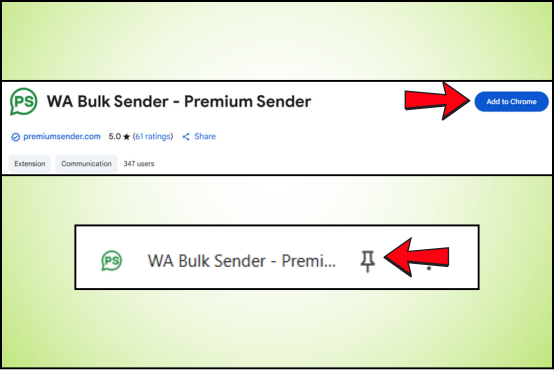
Step 1: Install the WhatsApp Bulk Message Sender
Download Premium Sender Chrome extension to start sending bulk WhatsApp messages instantly. This WhatsApp bulk message sender lets you send WhatsApp without saving number, making it easier to reach unknown contacts directly.
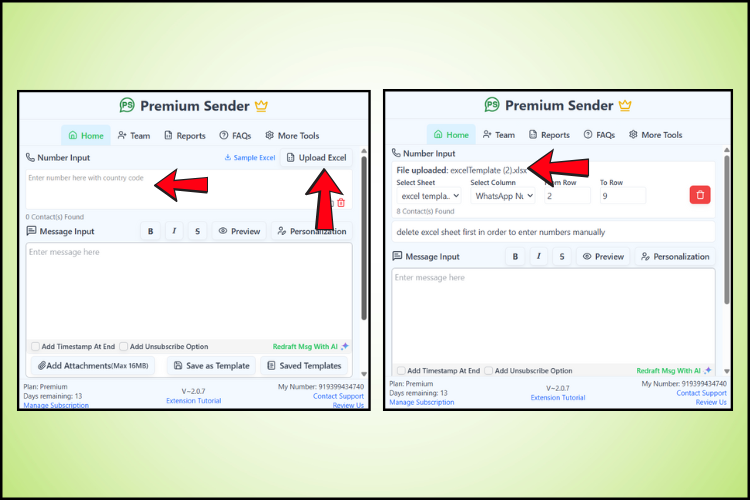
Step 2: Upload Excel Sheet
Add customer or team member numbers manually or upload your list using Excel or CSV to prepare your campaign. With Premium Sender, you can send WhatsApp message without saving number in bulk and manage contacts easily, saving valuable time during outreach.

Step 3: Create Personalized Messages
Craft engaging, personalized messages using dynamic variables like names, departments, or shift timings. This WhatsApp bulk SMS sender tool allows you to customize every message, ensuring better engagement. Personalizing messages for each recipient makes it easy to share updates or assign tasks efficiently.
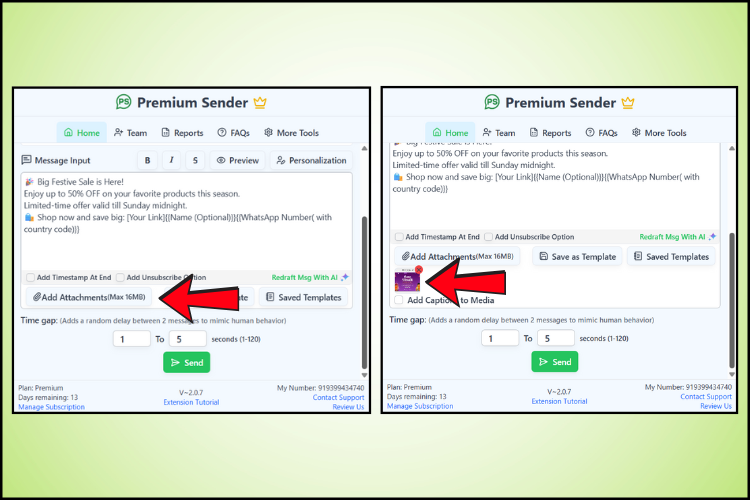
Step 4: Attach Important Files
Include up to 7 attachments like brochures, images, videos, PDFs, or other important documents to enhance your campaigns. With this WhatsApp bulk message software, you can send WhatsApp message without saving number and still share multimedia effortlessly to make your outreach more impactful.
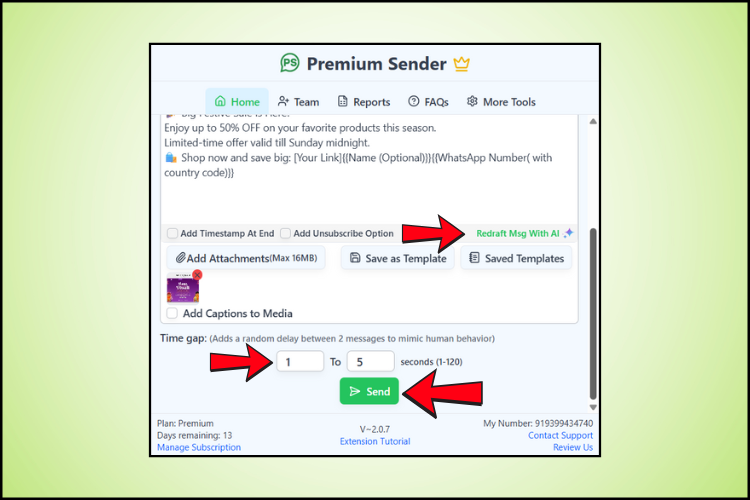
Step 5: Use AI Re-drafter and Set Delay to avoid WhatsApp Ban and Send
You can use AI Re-drafter if you want to edit the message. Use smart delay settings to prevent WhatsApp bans and ensure safe delivery. Premium Sender allows you to send bulk WhatsApp messages smoothly while maintaining compliance. Simply click send to deliver direct WhatsApp messages and boost your productivity without manually adding contacts.
Use Cases of WhatsApp Bulk Sender
WhatsApp Bulk Sender and WhatsApp Bulk Message Sender let businesses, marketers, and teams send bulk WhatsApp messages safely and efficiently. Tools like bulk WhatsApp sender, WaSender, WhatsApp Bulk Message Sender free, WhatsApp Bulk Message Sender extension, WhatsApp Bulk Message Sender free Chrome extension, WhatsApp message sender, WhatsApp bulk messenger, and WhatsApp bulk SMS sender help reach large audiences, save time, and improve engagement.
1. Marketing Campaigns
Promote products, offers, or services to hundreds or thousands of contacts using WhatsApp Bulk Sender, WhatsApp bulk sender, or bulk WhatsApp sender.
2. Customer Updates
Send announcements, reminders, or notifications safely with WhatsApp Bulk Message Sender, WhatsApp bulk messenger, or WhatsApp message sender.
3. Event Invitations
Use WhatsApp Bulk Sender, WaSender, or WhatsApp Bulk Message Sender free tools to invite customers or team members to webinars, sales events, or online gatherings.
4. Internal Team Communication
Share tasks, schedules, or updates with employees using WhatsApp Bulk Sender, WhatsApp Bulk Message Sender extension, or bulk WhatsApp sender.
5. Customer Support and Alerts
Send alerts, confirmations, or support updates efficiently via WhatsApp Bulk Message Sender free Chrome extension, WhatsApp bulk messenger, or WhatsApp bulk SMS sender.
Challenges Faced While Sending Bulk Messages on WhatsApp
Using a bulk WhatsApp sender, WaSender, or any bulk message sender can make outreach faster, but it also comes with certain obstacles. Whether you are exploring how to send bulk messages on WhatsApp for marketing or using a WhatsApp Bulk Message Sender free tool, knowing these challenges will help you prepare better. Many businesses also try the WhatsApp Bulk Message Sender extension or even a WhatsApp Bulk Message Sender free Chrome extension for added convenience, but challenges still exist. These are the Challenges Faced While Sending Bulk Messages on WhatsApp:
1. Risk of Account Restrictions
WhatsApp has strict rules against spam. Using a WhatsApp bulk sender, WhatsApp Bulk SMS Sender, or engaging in wa sender bulk messaging too aggressively can trigger restrictions or bans, especially when sending bulk WhatsApp messages to unknown contacts.
2. Limited Message Personalization
When sending a bulk WhatsApp message to a large group, personalization often gets lost. Even the best WhatsApp Bulk Message Sender or WhatsApp bulk messenger may make the messages feel generic, leading to lower engagement.
3. Delivery Rate Uncertainty
Bulk WhatsApp tools such as a WhatsApp sender or bulk WhatsApp sender can send messages quickly, but delivery is not always guaranteed. Issues like blocked numbers, WhatsApp bulk SMS limits, or internet connectivity problems can affect performance.
4. Recipient Privacy Concerns
Sending bulk message WhatsApp campaigns without permission can be seen as intrusive. People may block your WhatsApp message sender, and your business reputation could suffer if you misuse a WhatsApp Bulk Message Sender free Chrome extension.
5. Time and Effort in List Management
Even with a WhatsApp Bulk Message Sender free version, preparing a clean contact list is crucial. Bulk WhatsApp campaigns require updated and verified numbers to ensure effective WhatsApp bulk messaging results.
Best Practices to Avoid Getting your WhatsApp Number Banned
If you are using a bulk WhatsApp sender, WaSender, or a bulk message sender, or planning how to send bulk messages on WhatsApp, it is important to follow safe practices. This ensures your account stays active while still reaching your audience effectively with a WhatsApp Bulk Message Sender or WhatsApp Bulk Message Sender free Chrome extension.
1. Use Verified and Opt-in Contacts
When running WhatsApp bulk messaging campaigns, only send bulk WhatsApp messages to people who have given permission. This reduces spam complaints and helps you maintain trust while using WhatsApp Bulk Message Sender, WhatsApp bulk messenger, or WhatsApp message sender tools.
2. Limit Daily Sending Volume
Even the most advanced WhatsApp Bulk Message Sender free or paid tools, WhatsApp bulk sender, or Wa Sender bulk messaging can cause issues if overused. Start with smaller batches of bulk WhatsApp messages and gradually increase the number.
3. Personalize Your Messages
Avoid sending the same bulk WhatsApp message to everyone. Personalizing content with a WhatsApp message sender, WhatsApp bulk message sender free, or WhatsApp Bulk Message Sender extension makes your outreach look authentic and reduces the chance of being flagged as spam.
4. Avoid Sending Unrelated Content
If you use a WhatsApp bulk sender, WhatsApp bulk message sender, or bulk WhatsApp sender, make sure your content matches your audience’s interests. Irrelevant bulk WhatsApp SMS campaigns can quickly lead to blocks and bans.
5. Monitor Delivery and Feedback
Track how your bulk message WhatsApp campaigns perform. If many messages are not delivered or you get frequent complaints, adjust your bulk WhatsApp strategy before WhatsApp takes action using tools like WhatsApp Bulk Message Sender or WhatsApp Bulk Message Sender free Chrome extension. Follow the listed Best Practices to Avoid Getting your WhatsApp Number Banned.
Tips for Sending Bulk WhatsApp Messages
Using a bulk WhatsApp sender, WhatsApp Bulk Sender, WaSender, WhatsApp Bulk Message Sender free, WhatsApp Bulk Message Sender extension, WhatsApp Bulk Message Sender free Chrome extension, WhatsApp message sender, WhatsApp bulk messenger, or WhatsApp bulk SMS sender can make messaging campaigns fast, safe, and effective. Follow these tips to reach your audience efficiently. Follow these Tips for Sending Bulk WhatsApp Messages:
1. Use Verified Contacts
Send bulk WhatsApp messages only to contacts who have opted in using a bulk WhatsApp sender, WhatsApp Bulk Sender, or WaSender.
2. Limit Daily Message Volume
Avoid restrictions by sending smaller batches with WhatsApp Bulk Message Sender free, WhatsApp Bulk Message Sender extension, or WhatsApp Bulk Message Sender free Chrome extension.
3. Personalize Your Messages
Include names, locations, or custom fields using WhatsApp message sender, WhatsApp bulk messenger, or WaSender bulk messaging to improve engagement.
4. Avoid Irrelevant Content
Keep messages targeted and relevant with a bulk WhatsApp sender, WhatsApp Bulk Sender, or WhatsApp bulk SMS sender to maintain trust.
5. Monitor Delivery and Feedback
Track campaign results and adjust strategy using WhatsApp bulk messenger, WhatsApp message sender, or WaSender for better performance.
Conclusion
Sending bulk WhatsApp messages can be an effective way to engage customers, promote services, and share updates, but it must be done responsibly to avoid issues. Whether you are using a bulk WhatsApp sender, a WhatsApp bulk sender, or exploring how to send bulk messages on WhatsApp, it is important to follow safe practices with a WhatsApp Bulk Message Sender or WhatsApp Bulk Message Sender free Chrome extension.
Tools like a WhatsApp bulk message sender free or paid version, WhatsApp Bulk Message Sender extension, a bulk message sender, or a WhatsApp message sender can help you reach more people quickly. Using a WaSender, wa sender bulk messaging, or bulk WhatsApp sender also improves campaign efficiency.
However, successful bulk WhatsApp campaigns require verified contact lists, personalized bulk WhatsApp messages, and a focus on recipient privacy. By applying these strategies with WhatsApp bulk messenger tools, WhatsApp bulk SMS sender, or WhatsApp Bulk Message Sender, you can enjoy the benefits of WhatsApp bulk messaging, WhatsApp bulk SMS, and bulk WhatsApp message sender tools without risking account restrictions.
FAQ's
How do I send 10,000 messages on WhatsApp without getting banned?
Sending 10,000 messages on WhatsApp requires a safe and structured approach to protect your account. With the Premium Sender extension, you can use a bulk WhatsApp sender, WhatsApp Bulk Sender, or WaSender method that sends messages in controlled batches. Features like adjustable delays, message personalization, and attachment support make it more effective than a standard WhatsApp message sender, WhatsApp bulk messenger, or WhatsApp bulk SMS sender. Whether you want to send 1000 WhatsApp messages, run a bulk WhatsApp messaging campaign, or use a WhatsApp bulk message sender free, WhatsApp Bulk Message Sender extension, or WhatsApp Bulk Message Sender free Chrome extension, Premium Sender’s smart anti-ban system helps you reach your audience without risking account restrictions.
Steps to send 10,000 messages on WhatsApp without getting banned
1. Install Premium Sender Extension
Download and install the Premium Sender extension to start sending bulk messages with features like delays, personalization, and attachments.
2. Upload Contacts
Add numbers manually or upload an Excel/CSV list to your WaSender, bulk WhatsApp sender, or WhatsApp Bulk Sender tool.
3. Create Personalized Messages
Use dynamic fields with WhatsApp message sender, WhatsApp bulk messenger, or Wa Sender bulk messaging to personalize each message for better engagement.
4. Attach Media Files
Include images, PDFs, videos, or brochures using WhatsApp Bulk Message Sender extension, WhatsApp Bulk Message Sender free Chrome extension, or bulk WhatsApp sender tools.
5. Set Delays and Send
Adjust smart delays to avoid restrictions and safely send messages using WhatsApp bulk messenger, WhatsApp bulk SMS sender, or WhatsApp Bulk Sender.
How to send messages using a WhatsApp bulk message sender extension?
To send messages using a WhatsApp bulk message sender extension like Premium Sender, start by installing the free Chrome extension with a bulk WhatsApp sender, WhatsApp bulk sender, or WaSender. Import your contacts by uploading an Excel or CSV file, or paste numbers directly into the tool using Wa Sender or Wa Sender bulk messaging. Write your bulk WhatsApp message, then customize it using personalization features such as names or locations with WhatsApp sender, WhatsApp message sender, or WhatsApp bulk messenger.
You can also attach files like images, PDFs, or videos using WhatsApp bulk sender, bulk WhatsApp sender, or WhatsApp bulk messenger to make your WhatsApp bulk messaging campaign more engaging. Once everything is set, launch your campaign and let the WhatsApp bulk SMS sender, WhatsApp message sender, or WhatsApp bulk messenger system deliver your messages efficiently.
Step 1: Install the Extension
To send messages using a WhatsApp bulk message sender extension like Premium Sender, start by installing the free Chrome extension with a bulk WhatsApp sender, WhatsApp bulk sender, or WaSender.
Step 2: Import Contacts
Import your contacts by uploading an Excel or CSV file, or paste numbers directly into the tool using Wa Sender or Wa Sender bulk messaging.
Step 3: Compose Your Message
Write your bulk WhatsApp message, then customize it using personalization features such as names or locations with WhatsApp sender, WhatsApp message sender, or WhatsApp bulk messenger.
Step 4: Attach Files
You can also attach files like images, PDFs, or videos using WhatsApp bulk sender, bulk WhatsApp sender, or WhatsApp bulk messenger to make your WhatsApp bulk messaging campaign more engaging.
Step 5: Launch the Campaign
Once everything is set, launch your campaign and let the WhatsApp bulk SMS sender, WhatsApp message sender, or WhatsApp bulk messenger system deliver your messages efficiently.
How to send 1,000 messages at once in WhatsApp without broadcasting?
To send 1,000 messages at once on WhatsApp without using broadcast lists, you can use the Premium Sender extension. This bulk WhatsApp sender, WhatsApp bulk sender, or WaSender works directly on WhatsApp Web, allowing you to upload contact lists from Excel or CSV files using Wa Sender or Wa Sender bulk messaging.
You can send personalized bulk WhatsApp messages to multiple recipients without saving each number or creating a broadcast list using WhatsApp sender, WhatsApp message sender, or WhatsApp bulk messenger. With features similar to a WhatsApp bulk message sender free tool, Premium Sender also supports attachments using WhatsApp bulk sender, bulk WhatsApp sender, or WhatsApp bulk messenger and smart sending options to make your WhatsApp bulk messaging campaigns more effective and secure.
Steps to Use Premium Sender for 1,000 WhatsApp Messages
Step 1: Install the Extension
Install the Premium Sender extension with a bulk WhatsApp sender, WhatsApp bulk sender, or WaSender to start your campaign.
Step 2: Upload Contacts
Import your contacts via Excel or CSV files using Wa Sender or Wa Sender bulk messaging.
Step 3: Compose Personalized Messages
Write your bulk WhatsApp messages and personalize them using WhatsApp sender, WhatsApp message sender, or WhatsApp bulk messenger.
Step 4: Attach Media Files
Add images, PDFs, videos, or other attachments using WhatsApp bulk sender, bulk WhatsApp sender, or WhatsApp bulk messenger to make your messages more engaging.
Step 5: Launch the Campaign
Set smart sending options and start your campaign with WhatsApp bulk SMS sender, WhatsApp message sender, or WhatsApp bulk messenger to deliver messages safely and efficiently.
How can I send 100 messages at once on WhatsApp?
To send 100 messages at once on WhatsApp, you can use the Premium Sender extension instead of relying only on broadcast lists or groups. This bulk WhatsApp sender, WhatsApp bulk sender, or WaSender lets you send personalized bulk WhatsApp messages to multiple recipients while ensuring each message appears as a private chat.
Unlike group messages, which are visible to all members, Premium Sender works like a WhatsApp bulk message sender free tool, allowing you to import contacts using Wa Sender or Wa Sender bulk messaging, customize content with WhatsApp sender, WhatsApp message sender, or WhatsApp bulk messenger, and include attachments using WhatsApp bulk sender, bulk WhatsApp sender, or WhatsApp bulk messenger for more engaging WhatsApp bulk messaging campaigns.
Steps to Use Premium Sender for 100 WhatsApp Messages
Step 1: Install the Extension
Install the Premium Sender extension with a bulk WhatsApp sender, WhatsApp bulk sender, or WaSender.
Step 2: Upload Contacts
Import your contacts via Excel or CSV files using Wa Sender or Wa Sender bulk messaging.
Step 3: Compose Personalized Messages
Write your bulk WhatsApp messages and personalize them using WhatsApp sender, WhatsApp message sender, or WhatsApp bulk messenger.
Step 4: Attach Media Files
Include images, PDFs, videos, or other attachments using WhatsApp bulk sender, bulk WhatsApp sender, or WhatsApp bulk messenger to make your messages more engaging.
Step 5: Launch the Campaign
Set smart sending options and start your campaign with WhatsApp bulk SMS sender, WhatsApp message sender, or WhatsApp bulk messenger to deliver messages safely and efficiently.
Is there a WhatsApp bulk message sender free download for PC?
Yes, you can use free Chrome extensions like Premium Sender to send bulk messages on WhatsApp directly from your PC. This bulk WhatsApp sender, WhatsApp bulk sender, or WaSender allows you to import contacts from a CSV or Excel file using Wa Sender or Wa Sender bulk messaging, or simply copy and paste numbers. You can then create personalized bulk WhatsApp messages using WhatsApp sender, WhatsApp message sender, or WhatsApp bulk messenger, add attachments using WhatsApp bulk sender, bulk WhatsApp sender, or WhatsApp bulk messenger, and launch your WhatsApp bulk messaging campaign with ease, all while keeping your account safe through smart sending controls.
Steps to Use Premium Sender
Step 1: Install the Extension
Install the Premium Sender free Chrome extension with a bulk WhatsApp sender, WhatsApp bulk sender, or WaSender.
Step 2: Upload Contacts
Import your contacts via Excel or CSV files, or copy and paste numbers using Wa Sender or Wa Sender bulk messaging.
Step 3: Compose Personalized Messages
Write your bulk WhatsApp messages and personalize them using WhatsApp sender, WhatsApp message sender, or WhatsApp bulk messenger.
Step 4: Attach Media Files
Include images, PDFs, videos, or other attachments using WhatsApp bulk sender, bulk WhatsApp sender, or WhatsApp bulk messenger.
Step 5: Launch the Campaign
Start your campaign and let the WhatsApp bulk SMS sender, WhatsApp message sender, or WhatsApp bulk messenger deliver messages safely and efficiently.
What is WA Sender and how does it work?
WA Sender, like Premium Sender, is a Chrome extension for bulk WhatsApp messaging and personalization. This bulk WhatsApp sender, WhatsApp bulk sender, or WaSender allows you to send messages to multiple recipients directly from WhatsApp Web without saving contacts or using broadcasts. It works as a WhatsApp Bulk Message Sender for businesses aiming to streamline communication, helping small teams run WhatsApp bulk messaging campaigns with custom content, attachments using WhatsApp bulk messenger, and safe sending options with WhatsApp sender, WhatsApp message sender, or WhatsApp bulk SMS sender.
Steps to Use WA Sender for Bulk WhatsApp Messaging
Step 1: Install the Extension
Install WA Sender or Premium Sender with a bulk WhatsApp sender, WhatsApp bulk sender, or WaSender.
Step 2: Upload Contacts
Import your contacts via Excel or CSV files, or manually add numbers using Wa Sender or Wa Sender bulk messaging.
Step 3: Compose Personalized Messages
Write your bulk WhatsApp messages and personalize them using WhatsApp sender, WhatsApp message sender, or WhatsApp bulk messenger.
Step 4: Attach Media Files
Include images, PDFs, videos, or other attachments using WhatsApp bulk sender, bulk WhatsApp sender, or WhatsApp bulk messenger.
Step 5: Launch the Campaign
Start your campaign and let the WhatsApp bulk SMS sender, WhatsApp message sender, or WhatsApp bulk messenger deliver messages safely and efficiently.
Where can I find a free bulk message sender for WhatsApp?
Premium Sender is a powerful WhatsApp bulk messaging tool that lets you send personalized messages to unlimited contacts directly from WhatsApp Web without saving numbers or using broadcast lists. This bulk WhatsApp sender, WhatsApp bulk sender, or WaSender supports importing contacts from Excel or CSV files using Wa Sender or Wa Sender bulk messaging, adding attachments with WhatsApp bulk messenger, and customizing messages for each recipient using WhatsApp sender, WhatsApp message sender, or WhatsApp bulk SMS sender, making it an ideal solution for businesses to run efficient and secure WhatsApp marketing campaigns.
Steps to Use Premium Sender for Bulk WhatsApp Messaging
Step 1: Install the Extension
Install Premium Sender with a bulk WhatsApp sender, WhatsApp bulk sender, or WaSender.
Step 2: Upload Contacts
Import contacts via Excel or CSV files using Wa Sender or Wa Sender bulk messaging.
Step 3: Compose Personalized Messages
Write your bulk WhatsApp messages and personalize them using WhatsApp sender, WhatsApp message sender, or WhatsApp bulk messenger.
Step 4: Attach Media Files
Include images, PDFs, videos, or other attachments using WhatsApp bulk sender, bulk WhatsApp sender, or WhatsApp bulk messenger.
Step 5: Launch the Campaign
Start your campaign and let the WhatsApp bulk SMS sender, WhatsApp message sender, or WhatsApp bulk messenger deliver messages safely and efficiently.
What is a WhatsApp bulk sender?
A WhatsApp bulk sender, bulk WhatsApp sender, or WaSender is a software application or platform that allows users to send messages to a large number of WhatsApp contacts at once without creating groups. These tools, including WhatsApp bulk sender, WhatsApp sender, WhatsApp message sender, or WhatsApp bulk messenger, are mainly used by businesses, teams, and organizations for marketing, communication, and customer engagement purposes. Using a Wa Sender or Wa Sender bulk messaging system can help streamline bulk WhatsApp messaging campaigns and improve outreach efficiency.
What is the WhatsApp bulk message sending service?
A WhatsApp bulk message sending service, bulk WhatsApp sender, or WaSender uses software to deliver the same message to many customers at once, often for marketing, updates, or promotions. These messages can include personalized content, attachments, multimedia, and analytics. Services can range from third-party tools, Chrome extensions like WhatsApp sender, WhatsApp message sender, or WhatsApp bulk messenger, to official solutions such as WhatsApp Business App broadcast lists or the WhatsApp Business API, which is intended for larger businesses and requires more technical integration. Using Wa Sender or Wa Sender bulk messaging helps businesses streamline bulk WhatsApp messaging campaigns efficiently.
Is WhatsApp bulk message sender free?
Yes, there is a free version available with Premium Sender for sending bulk WhatsApp messages. Using Premium Sender, you can run small campaigns with your WhatsApp bulk sender, bulk WhatsApp sender, or WaSender without paying. The tool allows you to personalize messages using WhatsApp sender, WhatsApp message sender, or WhatsApp bulk messenger, attach files, and even use Wa Sender bulk messaging features to reach multiple contacts efficiently. This free version is ideal for businesses, teams, and marketers to try bulk WhatsApp messaging before upgrading to the full plan.