
How to Make Fake WhatsApp Chat? Fake WhatsApp Chat Generator
Introduction: Make Fake WhatsApp Chat
You can make fake WhatsApp chat so realistic that most people cannot tell it apart from a real conversation. And you can do it in under two minutes, entirely from your browser, without downloading anything or touching your actual WhatsApp account.
Real WhatsApp screenshots are messy. Notification bars, cropped awkwardly, battery warnings, privacy risks. A fake WhatsApp chat generator solves all of that by letting you build the entire conversation from scratch, with full control over every detail. Simply open the tool, fill in your contact details and messages, customize the look, and download a clean screenshot in seconds. Whether you need a client mockup, a social media post, a UI demo, or just a convincing prank, knowing how to make fake WhatsApp chat cleanly is a skill that saves time and produces better results than any screenshot ever could.
This guide covers exactly how to make fake WhatsApp chat using the free tool from Premium Sender, what makes a fake WhatsApp message look convincing, and how to spot one when someone sends it to you.
What Is a Fake WhatsApp Chat Generator?
A Fake WhatsApp Chat Generator is a browser-based tool that lets you build a realistic-looking WhatsApp conversation from scratch without involving your real WhatsApp account at all. You set the names, messages, timestamps, delivery ticks, and profile pictures, and the tool outputs a clean image that looks exactly like a genuine WhatsApp screenshot.
The fake WhatsApp chat generator from Premium Sender is completely free, works on both mobile and desktop, and requires no sign-up or installation of any kind.
How to Make Fake WhatsApp Chat: Step by Step
The Premium Sender fake WhatsApp chat generator lets you make fake WhatsApp chat in three steps. No account needed. Open the tool at premiumsender.com/fake-whatsapp-chat-generator and follow the steps below.
Step 1: Fill in the Chat Details
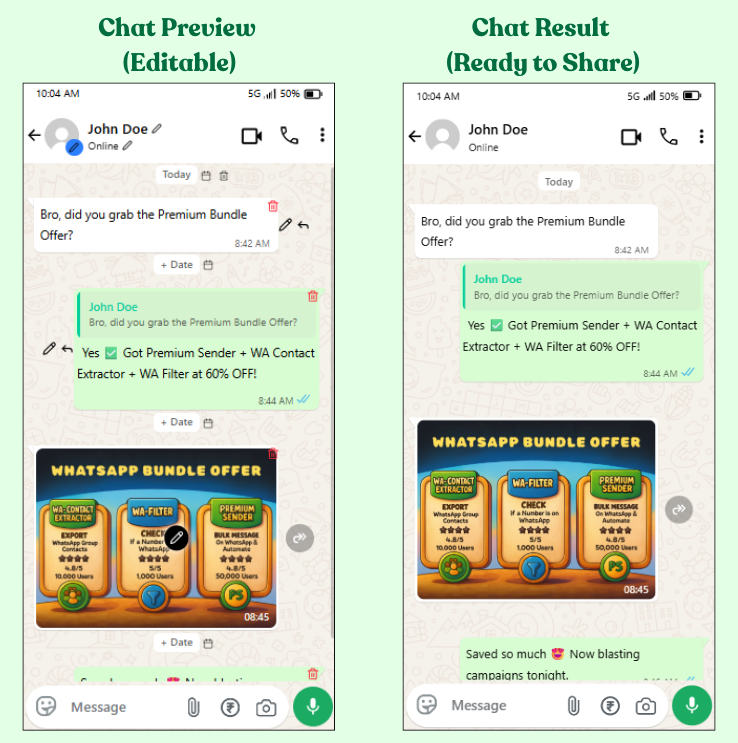
Enter the contact name and upload a profile picture. Set the online or offline status and last seen time if your scenario calls for it. Add messages one by one, switching between sender and receiver for each line. For every message, set the timestamp and choose the tick status: single grey for sent, double grey for delivered, double blue for read.
Step 2: Customize the Look
Choose between iOS and Android layout since both look noticeably different in bubble shape, font, and status bar style. Set the chat background, switch between light and dark mode, and add emojis or media placeholders where the conversation needs them. The live preview updates in real time so you can adjust until every detail looks right.
Step 3: Generate and Download
Click “Create Chat” to generate the final output. Review the preview for any timing inconsistencies or details that look off. Once satisfied, download the image. The output is a clean, high-resolution PNG ready to use in presentations, social posts, demo decks, or anywhere else you need it.
What You Can Change in the Fake WhatsApp Chats?
- Sender and receiver names and profile pictures
- Message content for both sides of the conversation
- Timestamps for every individual message
- Delivery tick status: sent, delivered, or read
- Device layout: iOS or Android
- Online or offline contact status
- Chat background and light or dark theme
- Emojis and media placeholders

Why People Make Fake WhatsApp Chat?
There are far more legitimate reasons to make fake WhatsApp chat than most people realize. The word “fake” sounds suspicious out of context but the use cases below are professional, creative, and entirely ethical.
1. Client Demos and Sales Mockups
Sales teams and marketers use a fake WhatsApp chat mockup to show clients what a WhatsApp campaign or chatbot flow looks like before building it. A visual in a deck is more persuasive than a written description every single time.
2. Social Media Content and Memes
A whatsapp fake chat built around a relatable or humorous scenario performs well across Instagram, X, and TikTok. A fake WhatsApp chat generator lets you design the scenario exactly without involving real people or real messages.
3. UI and UX Design
Designers use a fake WhatsApp chat mockup to prototype how a chatbot or integration appears inside WhatsApp before writing a single line of code. It communicates the idea immediately inside any product deck or Figma file.
4. Training and Education
Trainers and teachers use a fake WhatsApp message creator to build realistic scenario-based examples for digital literacy classes, phishing awareness sessions, and communication workshops without using anyone’s private messages.
5. Pranks and Entertainment
A fake WhatsApp chat between fictional characters or an obviously humorous exchange for a group of friends is one of the most popular uses of a fake chat wa generator. Keep it harmless and it is a perfectly legitimate creative use.
How a Fake WhatsApp Chat Generator Differs from Editing a Real Screenshot?
Editing a real screenshot requires image software, leaves compression artifacts, and produces inconsistent results that look off up close. A fake WhatsApp chat generator builds the conversation from clean code, which means every bubble, font, and spacing element matches the real WhatsApp interface exactly. The output is sharper, cleaner, and far more convincing than any manually edited screenshot.
Key Features of the Free Fake WhatsApp Chat Generator
The Premium Sender fake WhatsApp chat generator is built to make fake WhatsApp chat fast, clean, and convincing without needing any technical skills or paid tools. Here is everything it gives you out of the box.
1. Fully Customizable Conversations
Every element of the fake WhatsApp chat is editable. Sender name, receiver name, profile picture, message text, timestamps, delivery ticks, and chat theme are all in your control. Whether you want to make fake WhatsApp chat for a client demo or a social media post, you are never locked into a template that limits what the conversation looks like.
2. iOS and Android Layout Options
Real WhatsApp looks noticeably different on iOS and Android, and so should your fake WhatsApp chat. The generator lets you switch between both device layouts so the bubble style, font, and status bar match the platform your audience uses. This is one of the details most fake WhatsApp chat generators skip entirely.
3. Instant Output in Under Two Minutes
You do not need to wait for rendering, processing, or exports. Once you fill in the details and click generate, your fake WhatsApp chat is ready to download immediately. The entire process from opening the tool to having a finished fake WhatsApp message screenshot takes less than two minutes.
4. Live Preview as You Build
Every change you make to the fake whatsapp chat updates in the live preview in real time. You can adjust timestamps, swap ticks from grey to blue, change the contact name, or switch the background and see exactly how the output will look before downloading. No guessing, no back and forth.
5. Mobile-Friendly and Free
The fake WhatsApp chat generator works smoothly on both phones and desktops. You do not need a laptop to make fake WhatsApp chat for a quick post or a last-minute demo. Open it from any browser on any device and the tool works the same way. And it is completely free, no subscription, no hidden export limit, no watermark.
6. No Sign-Up and No Download Required
To make fake WhatsApp chat with the Premium Sender generator, you do not create an account, enter an email, or install anything. Open the tool, build your fake whatsapp message, download the image, and you are done. Nothing stored, nothing saved, nothing shared.
Make Fake WhatsApp Chat That Looks Real: Best Tips
Filling in the fields is the easy part. To make fake WhatsApp chat that actually convinces people, the small details are what separate a good fake WhatsApp message from an obvious one.
1. Use Realistic Message Timing
Do not send a long reply one second after a short question. Real conversations have natural gaps. Vary your timestamps the way a real exchange flows, including longer gaps when the scenario calls for it. A 15-word reply arriving 30 seconds after a question reads as real. The same reply sent instantly looks generated.
2. Match the Status Bar to the Conversation Time
The status bar time at the top of the fake WhatsApp chat screenshot must match the message timestamps. A screenshot with a 9 PM status bar and 2 PM messages is immediately suspicious. This is one of the first things anyone checks when they suspect a whatsapp fake chat.
3. Write Like a Real Person Texting
Short replies. Contractions. Occasional emojis. Nobody types “I am going to check on that right now” in WhatsApp. They type “checking now” or “on it.” The dialogue is what makes or breaks a fake WhatsApp message. Write the way the person would actually text, not the way they would write an email.
4. Use Read Receipts Logically
If both people are actively trading messages, the ticks should be blue. If there is a gap before a reply, keep them grey until the conversation picks back up. Inconsistent read receipts are one of the fastest ways to identify a fake WhatsApp chat screenshot, so get this detail right.
5. Keep It Short and Purposeful
A fake whatsapp chat with 25 perfectly written messages where every reply arrives within seconds looks staged. Real conversations have short bursts, one-word replies, and natural pauses. Build only what you need and stop there.
Use Cases of Fake WhatsApp Chat Generator
Here is how different users make fake WhatsApp chat for their specific needs using the Premium Sender generator.
1. Marketing and Social Proof
A brand creating social proof content uses the fake WhatsApp message creator to design a clean customer testimonial conversation. The fake WhatsApp chat mockup drops into an Instagram story or ad creative without any of the clutter a real screenshot would carry.
2. Product Demos
A SaaS team building a demo deck for a WhatsApp chatbot integration uses create fake WhatsApp chat to show exactly how the bot responds inside a real-looking conversation. No development required before the client presentation.
3. Meme and Entertainment Content
A content creator uses how to generate fake WhatsApp chat knowledge to build a fictional exchange between two characters for a YouTube video or TikTok post. The fake chat wa generator output drops directly into the video edit without any extra design work.
4. Corporate Training
An HR or compliance team uses a fake whatsapp chat history built in the generator to show employees an example of a phishing attempt over WhatsApp. The realistic output makes the training scenario more impactful than a text description ever could.
How to Identify a Fake WhatsApp Chat Screenshot?
Knowing how to identify a fake WhatsApp chat screenshot is just as useful as knowing how to make fake WhatsApp chat. Here is what to check when a screenshot looks suspicious.
1. Check the Status Bar Against the Timestamps
The status bar time must match the message timestamps. A mismatch between the two is the fastest way to confirm a whatsapp fake chat screenshot was fabricated.
2. Look at Font, Bubble Spacing, and Padding
WhatsApp uses specific font weights, line heights, and bubble padding. A fake WhatsApp chat generator that is not well-built will have slightly off spacing or incorrect font rendering. Compare it against a real WhatsApp screenshot on the same device type.
3. Check Read Receipts Against Reply Timing
Blue ticks mean the message was read. If a message shows blue ticks but the reply comes hours later with no explanation, the logic is inconsistent. Real conversations follow a recognizable timing pattern. When that pattern breaks, the fake WhatsApp message is showing itself.
4. Look for Image Compression Artifacts
Edited screenshots often show JPEG noise around text areas, especially after being saved and re-saved multiple times. A real WhatsApp screenshot has clean, consistent rendering throughout. A doctored one has visible artifacts around bubble edges and text.
5. Ask for the Original
Ask the person to forward the screenshot directly from their phone via WhatsApp rather than sharing a saved image. Screenshots forwarded directly carry metadata that a create fake WhatsApp chat output or edited image typically does not.
Is It Legal to Make Fake WhatsApp Chat?
For most use cases, yes. When you make fake WhatsApp chat for demos, content creation, design mockups, training, or entertainment, it is legal in most countries. The line is crossed when a fake WhatsApp message is used to deceive, defame, defraud, or is submitted as evidence in a legal proceeding.
1. Legal Uses
- Client-facing demos and fake WhatsApp chat mockups
- Social media content using clearly fictional conversations
- UI prototypes and product presentations
- Education and training using a fake WhatsApp message creator
2. Uses That Cross the Line
- Impersonating a real person to cause financial or reputational harm
- Submitting fake WhatsApp chat history as evidence in any legal dispute
- Using a fake WhatsApp message to threaten, harass, or defraud someone
- Spreading verifiable misinformation about a real person or organization
Use the tool for creative, professional, and educational purposes and there is no issue.
Conclusion: Make Fake WhatsApp Chat
Making a fake WhatsApp chat used to mean bad image editing and results that fooled nobody. A proper fake WhatsApp chat generator changes that entirely. You can make fake WhatsApp chat that matches the real interface in every detail, control every tick and timestamp, and download a clean screenshot in under two minutes.
Whether you are building a client demo, designing a social post, creating a UI mockup, or running a training session, the free fake WhatsApp chat generator from Premium Sender gives you everything you need with nothing to download and nothing to sign up for.
You are two minutes away from a fake WhatsApp chat nobody can tell is fake.
FAQ: Make Fake WhatsApp Chat
How to Create Fake WhatsApp Chat?
To make fake WhatsApp chat using the Premium Sender generator, open the tool in your browser, fill in the contact name, add your messages with timestamps and ticks, pick your device layout, and download the image in under two minutes. No account, no download, and no technical skills needed. The fake WhatsApp chat generator gives you full control over every detail so you can make fake WhatsApp chat that looks exactly like a real conversation.
- Open premiumsender.com/fake-whatsapp-chat-generator in any browser
- Enter the contact name and upload a profile picture
- Add messages one by one, switching between sender and receiver for each line
- Set the timestamp and delivery tick for every message
- Choose iOS or Android layout to match your target device
- Click “Create Chat” to preview the output and download the image
How to Identify a Fake WhatsApp Chat Screenshot?
Anyone who knows how to make fake WhatsApp chat will tell you the status bar, timestamps, and read receipts are the first details that give a screenshot away. Most tools that make fake WhatsApp chat do not perfectly replicate every status bar element, which is exactly why it is the fastest check. Compare the font, bubble spacing, and read receipt logic against a real WhatsApp screenshot on the same device type to confirm the rest.
- Check if the status bar time matches the message timestamps in the conversation
- Look for font inconsistencies, uneven bubble padding, or incorrect spacing compared to a real WhatsApp screenshot
- Check if the read receipts make logical sense against the reply timing
- Zoom into text areas and look for JPEG compression artifacts from repeated saving and editing
- Ask the person to forward the screenshot directly from their phone rather than sharing a saved image
- Check if the battery level, signal bars, and network indicator are consistent with the time shown
How to Make a Fake WhatsApp Chat?
To make a fake WhatsApp chat that looks convincing, open the Premium Sender fake WhatsApp chat generator in your browser, fill in the contact details and messages with realistic timestamps and tick status, choose iOS or Android layout, and download the finished PNG. No real WhatsApp account is needed at any point. The whole process lets you make fake WhatsApp chat with full control over every visual detail including names, bubble style, background, and read receipts.
- Open the free fake WhatsApp chat generator at premiumsender.com/fake-whatsapp-chat-generator
- Set the contact name, profile picture, and online or offline status
- Type each message and assign it to the sender or receiver side
- Add timestamps that follow a natural conversation flow with realistic gaps between replies
- Set the tick status: single grey for sent, double grey for delivered, double blue for read
- Choose iOS or Android layout and set light or dark mode
- Download the finished image as a PNG once the live preview looks right
How to Generate Fake WhatsApp Chat?
The fastest way to generate fake WhatsApp chat is to open the Premium Sender fake WhatsApp chat generator, enter the contact details and messages, set the timestamps and tick status, choose iOS or Android layout, and download the finished PNG. To make fake WhatsApp chat that looks professional, always check the live preview before downloading and adjust any timing details that look off. The whole process takes under two minutes from start to finish.
- Go to premiumsender.com/fake-whatsapp-chat-generator on any device
- Fill in the sender and receiver details including name and profile picture
- Add all messages with individual timestamps and delivery tick status
- Select iOS or Android device type to match the correct WhatsApp interface style
- Set the chat background and choose between light or dark mode
- Hit “Create Chat” to generate the live preview
- Download the output as a high-resolution PNG image ready to use immediately
Is the Fake WhatsApp Chat Generator Completely Free?
Yes, the Premium Sender fake WhatsApp chat generator is completely free with no hidden charges, no watermark, and no usage limit. Open the tool, build your fake WhatsApp message, download the image, and you can make fake WhatsApp chat again immediately with no restrictions or sign-up required. You can make fake WhatsApp chat as many times as you need without ever creating an account or entering payment details.
- No sign-up or account creation required
- No watermark added to the downloaded fake WhatsApp chat image
- No limit on how many fake WhatsApp chats you can generate
- Works on both mobile and desktop browsers at no cost
- Download your fake WhatsApp chat as a clean PNG every time
Can I Make Fake WhatsApp Chat on My Phone?
Yes, you can make fake WhatsApp chat on any smartphone browser without downloading an app. The Premium Sender fake WhatsApp chat generator is fully mobile-friendly on both iPhone and Android. Open the tool from your phone browser, fill in the chat details, set the timestamps and ticks, preview the output, and download the image directly to your camera roll to make fake WhatsApp chat on mobile exactly the same as on desktop with no feature limitations.
- Open premiumsender.com/fake-whatsapp-chat-generator in your phone browser
- Fill in all the chat details the same way you would on desktop
- Use the live preview to check the output on your screen before downloading
- Download the finished fake WhatsApp chat image directly to your phone’s camera roll
- No app installation needed on iOS or Android