
Top 5 WhatsApp Unban Request Message Templates to Recover Your Account
Introduction
If your WhatsApp account has been banned, it can disrupt your communication and business activities instantly. Whether it’s due to policy violations, technical errors, or misunderstandings, getting your account unbanned often depends on how effectively you communicate your appeal.
In this article, we’ll guide you through the main reasons behind WhatsApp bans, explain the types of bans, and provide five WhatsApp unban request message templates you can use to request account restoration.
Top 5 WhatsApp Unban Request Message Templates
Use these templates as examples to write your own appeal based on your situation. Be sure to customize details like your registered phone number and issue type.
Template 1: General WhatsApp Unban Request Message
Subject: Request to Review My Banned WhatsApp Account
Hello WhatsApp Support Team,
My WhatsApp account linked to [your phone number] has been banned recently. I’m not sure about the exact reason, but I believe this might have been a misunderstanding. I request you to kindly review my account once again.
I assure you that I will strictly follow WhatsApp’s Terms of Service going forward. Please help me restore my account as I rely on it for daily communication.
Thank you for your time and understanding.
Regards,
[Your Name]
Template 2: WhatsApp Unban Message for Using Unauthorized Apps
Subject: Apology for Using an Unofficial App – Request to Restore My Account
Dear WhatsApp Support Team,
I recently learned that using modified apps like GB WhatsApp or WhatsApp Plus violates your policies. I was unaware of this earlier and immediately switched back to the official WhatsApp app.
Kindly reconsider my account ban associated with [your phone number]. I apologize for the mistake and assure you that I’ll continue using only the official version.
Thank you for your understanding.
Regards,
[Your Name]
Template 3: WhatsApp Unban Message for Spam or Bulk Messaging
Subject: Request to Unban Account – Apology for Excess Messaging
Hello WhatsApp Support,
My account [your phone number] may have been flagged for sending too many messages in a short period. I didn’t intend to violate any policies; the messages were sent for business-related updates.
I sincerely apologize for this and will ensure that I follow WhatsApp’s communication limits strictly. Kindly review my case and allow me to access my account again.
Thank you,
[Your Name]
Template 4: WhatsApp Unban Request Message for Multiple User Reports
Subject: Request for Account Reconsideration Due to Misunderstanding
Dear WhatsApp Support,
My account [your phone number] has been banned, possibly due to being reported by several users. I believe this was a misunderstanding as my intent was never to spam or offend anyone.
I request you to please review my activity and verify that no harmful content was shared. I genuinely value the platform and will adhere to all communication guidelines moving forward.
Sincerely,
[Your Name]
Template 5: WhatsApp Unban Message for Business Accounts
Subject: Request to Restore My WhatsApp Business Account
Hello WhatsApp Support Team,
My WhatsApp Business account linked to [your phone number] has been banned. My business depends heavily on this number for customer interaction and order management.
I request you to review my account and provide me an opportunity to continue operations while following all policies carefully. I truly value the trust and security of WhatsApp’s platform.
Kind regards,
[Your Name]
Send WhatsApp Messages in Bulk, Faster & Smarter
Automate personalized WhatsApp campaigns, send messages with multiple attachments, and reach thousands of contacts effortlessly.

Why WhatsApp Accounts Get Banned?
WhatsApp prioritizes user safety and data protection. When an account violates the platform’s Terms of Service, it may face temporary or permanent restrictions. Some of the common reasons include:
- Using unofficial or modified apps (like GB WhatsApp or WhatsApp Plus)
- Sending spam or bulk promotional messages
- Getting reported by multiple users
- Sharing inappropriate or misleading content
- Engaging in suspicious or automated activities
Why a Proper Unban Message Matters?
A clear, respectful, and honest unban message increases your chances of getting your account reviewed positively. WhatsApp’s support team evaluates your communication tone, clarity, and willingness to comply with their rules.
The right approach includes:
Taking responsibility for any mistakes
Explaining your situation briefly
Requesting a fair review
Promising to follow WhatsApp’s guidelines
Types of WhatsApp Bans
Before writing your unban message, it’s essential to know which type of ban applies to your account:
Temporary Ban: Usually occurs when you use third-party apps or engage in minor violations. The ban may lift automatically after a few hours or days.
Permanent Ban: Happens when serious or repeated violations occur. This requires submitting a formal WhatsApp unban request message to appeal the decision.
Tips for Submitting a WhatsApp Unban Request
Be polite, respectful, and concise in your message.
Avoid aggressive or blaming language.
Do not send multiple appeals within a short time.
Send your request via Settings → Help → Contact Us in the app, or email WhatsApp support if your account is completely inaccessible.
Wait patiently — it may take 24–48 hours for a response.
How to Avoid WhatsApp Bans
Always use the official WhatsApp app from Play Store or App Store.
Avoid sending bulk or promotional messages.
Do not add people to groups without consent.
Keep your app updated to the latest version.
Respect WhatsApp’s privacy and communication guidelines.
To know more about How to unban WhatsApp Account, check out the blog given below-
How to Unban WhatsApp Account?
Bonus Tip: Send Bulk WhatsApp Message from Excel File
To send bulk WhatsApp message from Excel file is the first step to unlocking the potential of bulk messaging for your business. If you want to send bulk WhatsApp message from Excel file easily and effectively, follow these steps to send WhatsApp messages from Excel seamlessly:
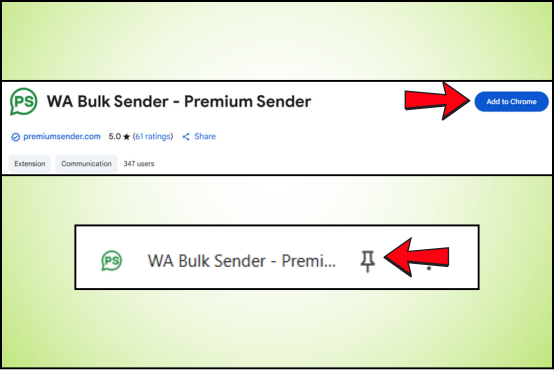
Step 1: Install the WhatsApp Bulk Message Sender
Download Premium Sender Chrome extension to start sending bulk WhatsApp messages instantly. This WhatsApp bulk message sender lets you send WhatsApp without saving number, making it easier to reach unknown contacts directly.
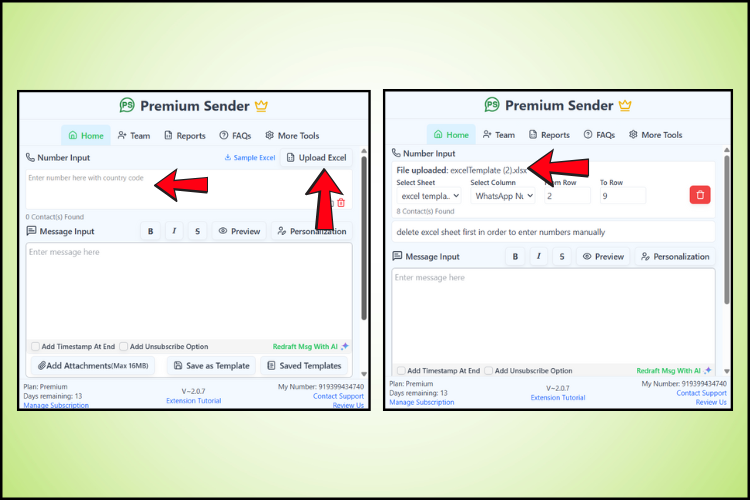
Step 2: Upload Excel Sheet
Add customer or team member numbers manually or upload your list using Excel or CSV to prepare your campaign. With Premium Sender, you can send WhatsApp message without saving number in bulk and manage contacts easily, saving valuable time during outreach.

Step 3: Create Personalized Messages
Craft engaging, personalized messages using dynamic variables like names, departments, or shift timings. This WhatsApp bulk SMS sender tool allows you to customize every message, ensuring better engagement. Personalizing messages for each recipient makes it easy to share updates or assign tasks efficiently.
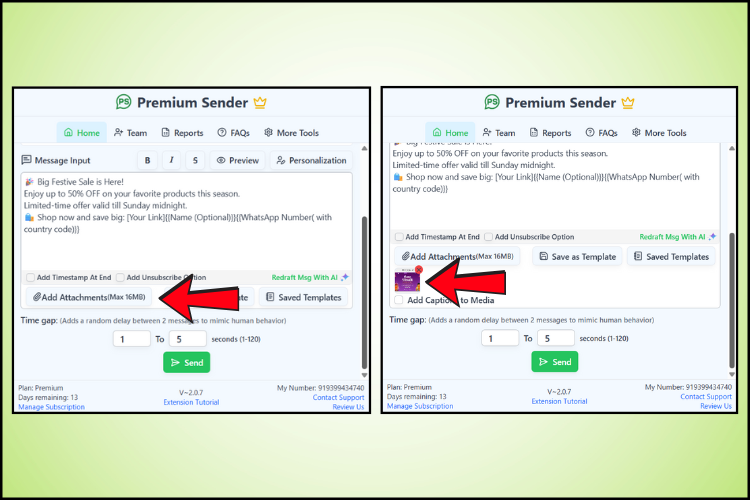
Step 4: Attach Important Files
Include up to 7 attachments like brochures, images, videos, PDFs, or other important documents to enhance your campaigns. With this WhatsApp bulk message software, you can send WhatsApp message without saving number and still share multimedia effortlessly to make your outreach more impactful.
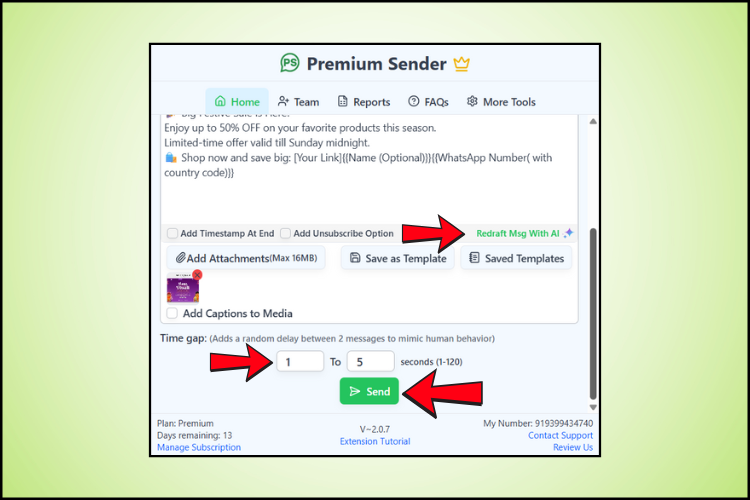
Step 5: Use AI Re-drafter and Set Delay to avoid WhatsApp Ban and Send
You can use AI Re-drafter if you want to edit the message. Use smart delay settings to prevent WhatsApp bans and ensure safe delivery. Premium Sender allows you to send bulk WhatsApp messages smoothly while maintaining compliance. Simply click send to deliver direct WhatsApp messages and boost your productivity without manually adding contacts.
Conclusion
A banned WhatsApp account can be stressful, especially if it affects your personal or business communication. However, by sending a professional and respectful WhatsApp unban request message, you can increase the chances of reinstating your account.
Use the templates above as a guide and ensure that you comply with all of WhatsApp’s policies in the future to maintain uninterrupted communication.
FAQ's
How do I send a WhatsApp unban request?
There are two primary methods to submit an unban request to WhatsApp. The method you use depends on what you see when you open the app.
Method A: In-App “Request a Review” (If the option is available)
This is the quickest way and should be your first choice if you see the option.
Open WhatsApp on your phone.
You will likely see a message that reads: “This account is not allowed to use WhatsApp.”
Look for a button that says “Request a Review” or “Support”. Tap on it.
A text box will appear. This is where you should write your polite appeal. Use one of our carefully crafted templates from this article and modify it to fit your situation.
Submit your request. The app may also automatically attach diagnostic information to help the support team understand the issue.
Method B: Emailing WhatsApp Support (If you are locked out or see no other option)
If you can’t access the in-app support feature, sending a direct email is the best alternative.
Compose a new email.
Use a clear subject line. A good subject line gets attention and provides immediate context. Use:
Urgent: Request to Unban My WhatsApp Account - +[Your Country Code][Your Full Number](e.g.,Urgent: Request to Unban My WhatsApp Account - +91 9876543210).Address the email correctly. Send it to the official support channel:
General Support:
support@whatsapp.comFor specific device issues:
android_web@support.whatsapp.comoriphone_web@support.whatsapp.com
Write the body of the email. Copy and paste the most suitable template from our list. Be sure to personalize it and include your full phone number in the international format.
Send the email and wait patiently for a response.
How long does WhatsApp take to reply to an unban request?
While there is no fixed timeline, you can typically expect a response from WhatsApp support within 24 to 72 hours. However, this timeframe can vary depending on several factors:
The Complexity of Your Case: A temporary ban due to an automated flag might be resolved quickly. A permanent ban that requires a manual review by a human agent will naturally take longer.
Support Team’s Workload: The volume of requests WhatsApp receives can impact response times. During peak times, it might take a bit longer.
The Clarity of Your Request: A well-written, clear, and concise unban request (like the templates we provide) is easier for the support team to process, which can lead to a faster resolution.
Important: Avoid sending multiple requests while you wait. This will not speed up the process and may reset your position in the support queue, causing further delays.
Can a permanently banned WhatsApp account be unbanned?
Yes, it is possible, but it is not guaranteed. The success of your appeal depends almost entirely on the reason for the ban.
When an unban is LIKELY: If your account was banned due to a misunderstanding, an error by WhatsApp’s automated system, or a first-time violation of a less severe rule (e.g., being added to too many groups by others, causing a spam flag), a polite and honest appeal has a very good chance of success.
When an unban is DIFFICULT: Permanent bans are issued for serious violations of WhatsApp’s Terms of Service. Reversing a ban for these reasons is extremely challenging. These violations include:
Engaging in illegal activities.
Sending large-scale spam or malware.
Impersonating someone else.
Promoting hate speech, violence, or threatening content.
Sharing explicit or illegal material.
Even in serious cases, a sincere apology and a promise to adhere to the terms of service can sometimes lead to a second chance, but you should manage your expectations.
What should I avoid when submitting a WhatsApp unban message?
How you communicate in your request is just as important as what you say. To maximize your chances of getting your account back, you must avoid these common mistakes:
DON’T Be Aggressive or Blame WhatsApp: Using angry, demanding, or threatening language is the fastest way to get your request ignored. The support team is there to help, so be respectful and polite.
DON’T Send Multiple Emails: Bombarding their inbox will not get you a faster response. Send one clear request and wait patiently.
DON’T Be Vague: A message that just says “Please unban my account” is not helpful. Provide your number and a brief, honest explanation of what might have happened.
DON’T Use Generic Templates Verbatim: Our templates are a starting point. You must personalize them with your details and specific situation. A copied-and-pasted message without any personal touch is easy to spot and dismiss.
DON’T Lie or Make False Excuses: WhatsApp has system logs. If you knowingly violated a policy, it’s better to be honest, apologize, and state that it won’t happen again. Lying will damage your credibility and ruin your chances.
Will using third-party apps lead to a ban again?
Yes, absolutely. Using modified, unofficial versions of WhatsApp is one of the most common reasons for account bans. If you get your account back, you must stop using these apps immediately to avoid being banned again, likely permanently.
These apps, such as GBWhatsApp, WhatsApp Plus, FMWhatsApp, and others, are a direct violation of WhatsApp’s Terms of Service. They are considered a major risk for two main reasons:
Security and Privacy: WhatsApp cannot guarantee the safety of your data on these apps. They are not end-to-end encrypted and could expose your private messages, contacts, and media to third parties.
Terms of Service Violation: Their terms explicitly state that using unauthorized applications will result in a ban.
Action Required: To protect your account, uninstall any modified versions and download the official WhatsApp application from the Google Play Store (for Android) or the Apple App Store (for iPhone). This is the only way to ensure your account remains secure and active.